

A visual identity is more than a logo. It’s the collection of choices that helps people recognize your business and understand what it feels like to work with you. Your colors, type, photography, layouts, and small details all play a part.
If you’re building a brand for the first time, it’s easy to start with the fun stuff: saving color palettes, browsing fonts, sketching logos. But strong visual identity design starts with a little clarity about your business and the people you want to reach.
Here’s a practical process to help you build an identity that feels like you and works in the real world.
1. Get clear on what your brand needs to say
Before you choose colors or fonts, take a step back. Your visual identity should support your business goals, not just reflect your personal taste.
Start by answering a few questions:
What do you offer, and who is it for?
What makes your approach different?
What do you want customers to feel when they find you?
What should they understand about your business right away?
Then choose three to five words that describe the impression you want to make. You might choose “warm, thoughtful, and grounded” or “bold, direct, and modern.” These words give you a useful filter when you’re making design decisions.
For example, if “approachable” is important, a highly formal look may send the wrong signal. If your service is precise and technical, your design may need to feel clear and organized rather than loose and expressive.
This isn’t about finding the perfect words. It’s about setting a direction you can return to when you’re unsure.
2. Look around before you make anything
Research helps you understand the visual world your business is entering. Look at businesses in your category, especially the ones your potential customers may compare you with.
Notice what appears often. Are competitors using similar colors, serif fonts, or photography styles? Do customers rely on category conventions to understand what a business does? Then look for a way to feel distinct without becoming confusing.
You can also ask a few people who fit your audience what they notice about your current brand, if you have one. What do they think you offer? What words come to mind? Their answers can reveal a gap between what you intend to communicate and what people actually see.
Keep the research focused. You’re looking for useful patterns and opportunities, not a reason to copy someone else’s logo or follow every trend.
3. Create a simple creative brief
A brief turns your early thinking into a practical guide. It doesn’t need to be long. One page is enough to capture:
Your audience and the problem you help them solve
Your brand’s personality and key differentiators
The feeling you want people to take away
Businesses or visual styles you want to avoid
Where the identity needs to appear
That last point matters. A brand used on a website, social media, invoices, packaging, signage, and printed materials has different needs from one used only on a digital storefront.
List the real places your identity will show up. This helps you make choices that work at different sizes and in different formats, rather than designing only for a presentation slide.
4. Set a visual direction
Now you can begin exploring how the strategy might look. Gather references for color, typography, photography, texture, and layout. Arrange them into one or two moodboards, then compare each direction with the words from your brief.
Ask:
Does this feel right for the people I want to reach?
Does it reflect the kind of experience I offer?
Could it be mistaken for a competitor’s brand?
Will it still feel appropriate as my business grows?
Try to evaluate the whole direction, not one isolated color or font. A palette that feels plain on its own may work beautifully with the right typography and photography.
At this stage, you’re choosing a visual world, not finalizing every detail. Give yourself room to refine.
5. Build a flexible logo and color system
A logo is one part of your identity, not the entire thing. You may need a primary logo, a compact version for small spaces, and a one-color option for situations where a full-color logo won’t work.
Test your logo where it will actually appear: on a phone screen, a social profile, a business card, and a light or dark background. If the design becomes difficult to recognize at small sizes, it may need a simpler variation.

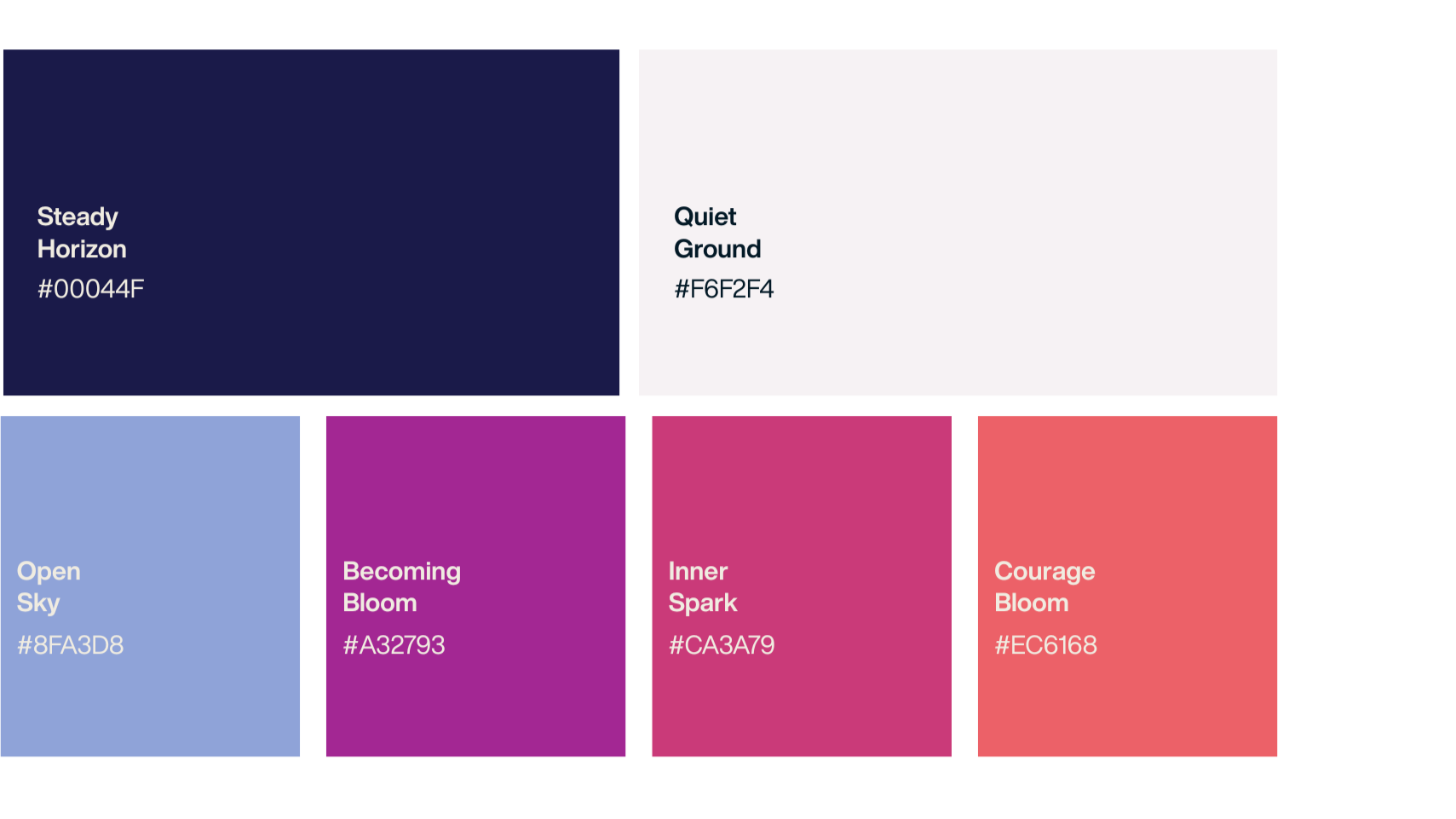
Choose colors with a purpose, too. A small, considered palette is often easier to use consistently than a collection of unrelated favorites. Define the role of each color, such as:
Primary brand color
Background or neutral color
Text color
Accent color for important details
Check that text remains readable against the backgrounds you plan to use. The W3C’s guidance on color contrast explains the minimum contrast ratios for text in web content. As a general rule, WCAG calls for a 4.5:1 contrast ratio for normal text and 3:1 for large text. Don’t use color alone to communicate important information; labels, icons, or patterns can help make meaning clear.
6. Choose typography and supporting details
Typography has a strong effect on how a brand feels. A display font can add personality, while a clear, readable font helps people move through your website and other materials.
Keep the system manageable. Many small businesses can start with one font family or a pairing of a heading font and a body font. Set simple rules for headings, paragraphs, buttons, and captions, then test them with real copy on a phone screen. Fonts that look lovely in a specimen can be harder to read in a long paragraph.
Next, consider the elements that help your identity feel complete:
Photography or illustration style
Shapes, borders, patterns, or textures
Icon style
Spacing and layout preferences
These supporting details should feel connected to the rest of your system. If your logo is calm and minimal but your social templates are crowded and brightly colored, the pieces may not feel like the same brand.
For inspiration, take a look at Purposeful Transitions, a Studio Pierson project created from the ground up. The identity brings together a logo, color palette, typography, website, and social media templates to give the business a consistent presence.
7. Put the identity to work before you launch
Before you call the identity finished, try it in a few everyday situations. Create a sample website page, a social post, an invoice, and a printed item such as a business card. You don’t need to make the whole marketing toolkit yet. You just want to see how the pieces work together.
Look for practical issues:
Is the text easy to read?
Does the logo work at small sizes?
Are important details clear on a phone?
Do the colors and type feel consistent across formats?
Can someone tell what your business offers?
Ask a few potential customers or trusted colleagues what they think the business does and what stands out. Their feedback can help you spot confusing details. Try not to treat every personal preference as a design problem. Focus on whether people understand the business and whether the identity supports the experience you want to offer.
8. Make a guide you’ll actually use
Once your identity is in place, create a short set of brand guidelines. Think of it as a reference sheet for you, future collaborators, or anyone making materials for your business.
Include the approved logo variations, color values, type choices, imagery style, and a few examples of how to use the system. Add clear notes about what to avoid, such as stretching the logo or placing it on a background where it’s hard to read.
Keep your files organized, too. Name them clearly and save final versions in one shared location. A simple guide and tidy folder can do a lot to prevent the “which logo file is the current one?” mystery.
A visual identity that can grow with you
Your first visual identity doesn’t need to predict every future version of your business. It needs to give you a clear, consistent starting point: something recognizable, useful, and connected to the way you work.
Start with strategy. Make choices with your audience and real-world needs in mind. Then test the system in the places customers will see it.
If you’re ready to explore a brand identity for your business, you can view more Studio Pierson projects or get in touch.